The Lightness Curve Mistake Every Palette Makes
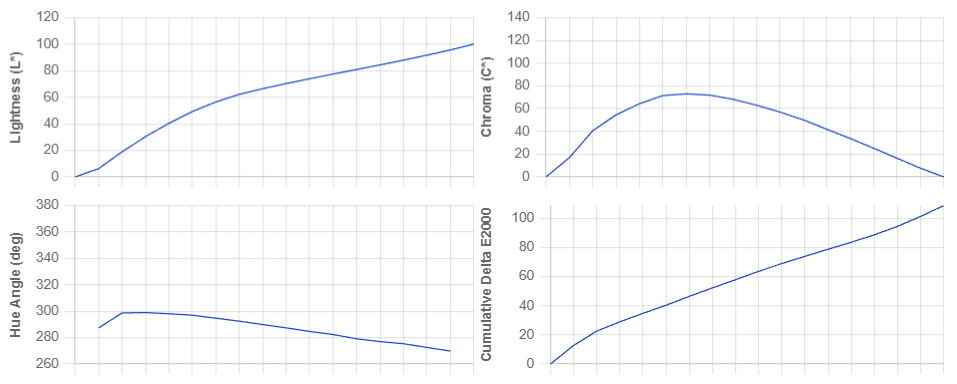
The palette looked perfect in the color tool. Twelve shades, evenly spaced from L*=95 down to L*=10 in CIELAB. Clean intervals. Predictable progression.
On screen, shades 4 through 7 looked nearly identical. The dark end felt muddy and indistinct. The light end felt compressed. Adjustments were made by eye — pull this shade darker, push that one lighter — until it "felt right."
This is the standard workflow. It is also a symptom of building on the wrong measurement of lightness.
What L* Actually Measures
CIELAB's L* (pronounced "L-star") was designed in 1976 to be perceptually uniform for achromatic colors — shades of gray. Two grays that differ by 10 L* units should look equally different anywhere on the scale. For gray, L* does its job.
For chromatic colors — blue, red, yellow, any hue — L* breaks.
The problem: L* measures a color's contribution to luminance, but it ignores the perceptual brightness contributed by chroma (saturation). A saturated blue at L*=50 does not look like a gray at L*=50. It looks brighter. Significantly brighter.
When you space a blue ramp at equal L* intervals, the chromatic shades appear lighter than their measured value — pushing the perceived midpoint down the scale, compressing the upper range, and making the dark end feel heavier and more congested than the numbers predict.
The Helmholtz–Kohlrausch Effect
This phenomenon has a name: the Helmholtz–Kohlrausch effect. It was documented independently by Hermann von Helmholtz and Wilhelm von Brücke in the 1850s, and confirmed repeatedly since. Saturated colors appear brighter than achromatic colors at the same measured luminance.
The effect is hue-dependent. Blue and violet show the strongest shift — a highly saturated blue appears dramatically brighter than its L* value. Yellow and olive show the smallest shift.
In practice, this means:
- A vivid blue ramp built on linear L* will look bunched in the midrange — the chromatic shades appear lighter than predicted, creating a zone of near-identical perceived steps.
- The dark end of the ramp looks heavier and more compressed than the light end — because at low lightness, chroma is constrained by gamut and the H–K correction shrinks, while at middle lightness, full chroma amplifies perceived brightness unevenly.
- Designers who build palettes in CIELAB or HSL correct for this intuitively — darkening certain shades, lightening others — without knowing they are manually compensating for a systematic measurement error.
Every palette built on L* carries this error. The numbers are correct. The perception is wrong.
The 2023 Fix: Equivalent Achromatic Lightness
In 2023, High et al. published a corrected lightness model: Equivalent Achromatic Lightness (EAL).
The formula adds a chroma-scaled, hue-dependent correction to L*:
L_EAL = L* + (f_BY(h) + f_R(h)) × C*Where:
L*— standard CIELAB lightnessC*— chroma (distance from the gray axis)h— hue angle in CIELABf_BY(h)— blue-yellow correction coefficient, a sinusoidal function of huef_R(h)— red correction coefficient, a second sinusoidal function of hue
The two correction terms together model the two primary opponent-color channels (blue-yellow and red-green) through which the Helmholtz–Kohlrausch effect operates. The correction is largest for blue-violet hues and smallest for yellow-green.
Example: A saturated blue at L*=50, C*=40 might yield L_EAL = 56. Its perceived lightness is 6 units higher than L* reports — a 12% error that compounds across every step in the ramp.
For a neutral gray at the same L*=50, C*=0, L_EAL = 50. No correction needed. The effect only applies where chroma is present.
Why This Matters for Ramp Construction
Building a ramp with equal L* steps produces unequal EAL steps — the perceived steps are irregular even when the measured steps are not. The irregularity is concentrated in the high-chroma midtone zone, which is exactly where most of the "usable" shades of a design palette live.
Building a ramp with equal EAL steps produces a palette where every adjacent pair is as perceptually distinct as every other adjacent pair. The dark end doesn't collapse. The midrange doesn't compress. No manual correction is needed.
The difference is visible without measurement: an EAL-linear blue ramp reads as twelve distinct shades from dark to light, with none of the "same four shades in the middle" problem. An L*-linear blue ramp of the same range reads as clusters with gaps.
The Dark End Specifically
The compression at the dark end of L*-based ramps is especially severe for saturated hues — and the reason is geometric.
At low lightness, the gamut constrains how much chroma is achievable. A blue at L*=10 can only reach C*=10–15 before going out of gamut. At L*=50, it can reach C*=35–40.
This means the H–K correction (which is proportional to C*) is small in the darks and large in the midtones. When you space steps by L*, the chromatic boost at the midrange pushes those shades farther apart in perception, while the low-chroma darks remain tightly clustered. The result is disproportionate compression in the dark zone — the very zone where fine distinction matters most for dark surfaces, dark text, and dark mode components.
CIELAB does not model this. EAL does — the correction accounts for the chroma falloff at the extremes, producing steps that are perceptually even regardless of how chroma varies across the range.
What Correct Lightness Linearity Looks Like
A palette scores well on lightness linearity when its EAL values progress in a straight line from step 0 to step N. Not its L* values — its EAL values.
In the Chromametry framework, lightness linearity is measured by fitting a linear regression to EAL across the steps and computing RMSE against the fitted line. A score of 1.0 is a perfect straight line in perceived lightness. A score below 0.85 means at least one zone of the ramp will feel clustered or gapped in use.
The industry benchmark shows the cost of ignoring this: palettes built in HSL (which uses a simplified lightness model unrelated to perception) score consistently lower on lightness linearity than palettes built in OKLCH. The correlation holds even when HSL and OKLCH palettes are compared at the same step count and hue.
The Practical Takeaway
If your palette was built in HSL, HSB, or by spacing L* values evenly in CIELAB, its lightness curve is wrong. The numbers look correct. The perception is systematically uneven — and the irregularity is concentrated in the dark zone and the high-chroma midrange.
The fix is not manual correction. Manual correction addresses symptoms without touching the cause. The fix is a generation method that distributes steps by EAL, not L* — so the ramp is perceptually even before any adjustments are made.
A palette that is EAL-linear doesn't need to be tweaked. Every shade falls where the eye expects it.