How to Use a Palette Without Checking WCAG Every Time
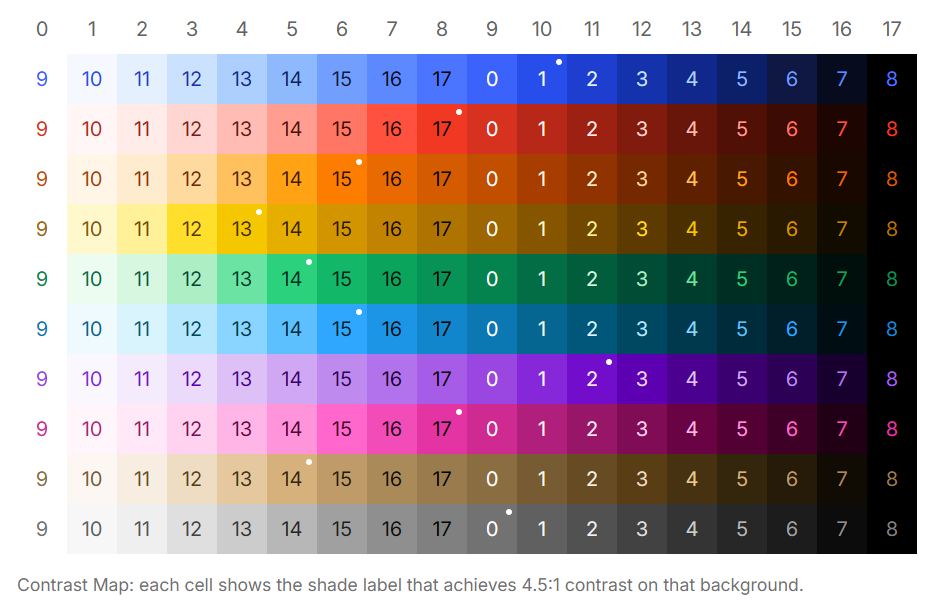
The standard workflow for accessible color: pick a text shade, pick a background shade, run them through a contrast checker. Pass or fail. Repeat for every combination in every component.
It's correct. It's also exhausting, incomplete, and doesn't scale.
A 12-shade palette has 66 possible pairs. A multi-hue system with 8 colors at 12 steps each has over 500 pairs. Checking them individually means checking them again every time the palette changes.
There's a better way — and it comes from measuring the palette once.
The Discovery: Contrast Span
Contrast span K is a single number that characterizes the accessibility of an entire palette:
K = the minimum step distance such that every pair of shades at distance ≥ K passes WCAG 4.5:1.
Measure it once. Use it everywhere.
For IBM Carbon (12 steps): K = 6. Every pair 6 or more steps apart passes 4.5:1. Every time. No checking needed.
For Adobe Spectrum (18 steps): K = 9. Same guarantee. No checking needed.
How to Use K
Once you know K, accessible color usage becomes arithmetic:
Text on a background? Ensure the shade index distance is ≥ K. Done.
Border color? Use K/3 — visible but not dominant, no WCAG requirement for decorative elements.
Hover state? ±1 step — perceptibly different, no contrast requirement.
Selected state? ±2K/3 — between border and text, clearly active.
No pair-by-pair verification. No contrast checker. Just distance.
For a light surface at index 2 with K=6:
| Role | Index | Guaranteed |
|---|---|---|
| Text | 2 + 6 = 8 | ✓ 4.5:1 |
| Border | 2 + 2 = 4 | decorative |
| Hover | 2 + 1 = 3 | perceptible |
| Selected | 2 + 4 = 6 | active state |
The entire component is specified by one number.
Why This Works
K is not a heuristic. It's a mathematical guarantee derived from the palette itself.
The definition requires that every pair at distance K passes — not most, not the ones you tested. Every pair at every index position. If any pair at distance K fails, K moves up to the next integer.
So when you use distance ≥ K, you're relying on a proven bound, not a spot check.
The Industry Was Already Using It
IBM Carbon, Adobe Spectrum, U.S. Web Design System, Salesforce Lightning, GitHub Primer — all document their palettes with specific shade recommendations for text, background, and interactive states.
None of them call it K. None of them define contrast span. But measure their palettes and you find K sitting there, consistent, at roughly half the step count.
These teams converged on the same structure through iteration. Hundreds of WCAG checks, palette adjustments, re-checks — until the numbers settled into a pattern that held. Then they encoded the output (use shade 900 for text on shade 50) without encoding the underlying reason.
K is that reason, made explicit. What took their teams months of iteration to discover by feel, you can measure in one pass and apply immediately.
One Measurement, Full Coverage
The practical workflow:
- Generate or receive a palette
- Measure K (Chromametry does this automatically)
- Use K as the distance rule for all text/background pairs
- Derive border, hover, selected from K arithmetically
- Never check a pair again unless the palette changes
When the palette changes, measure K again. One number updates the entire system.