Why a Good Color Palette Needs More Than Good Colors
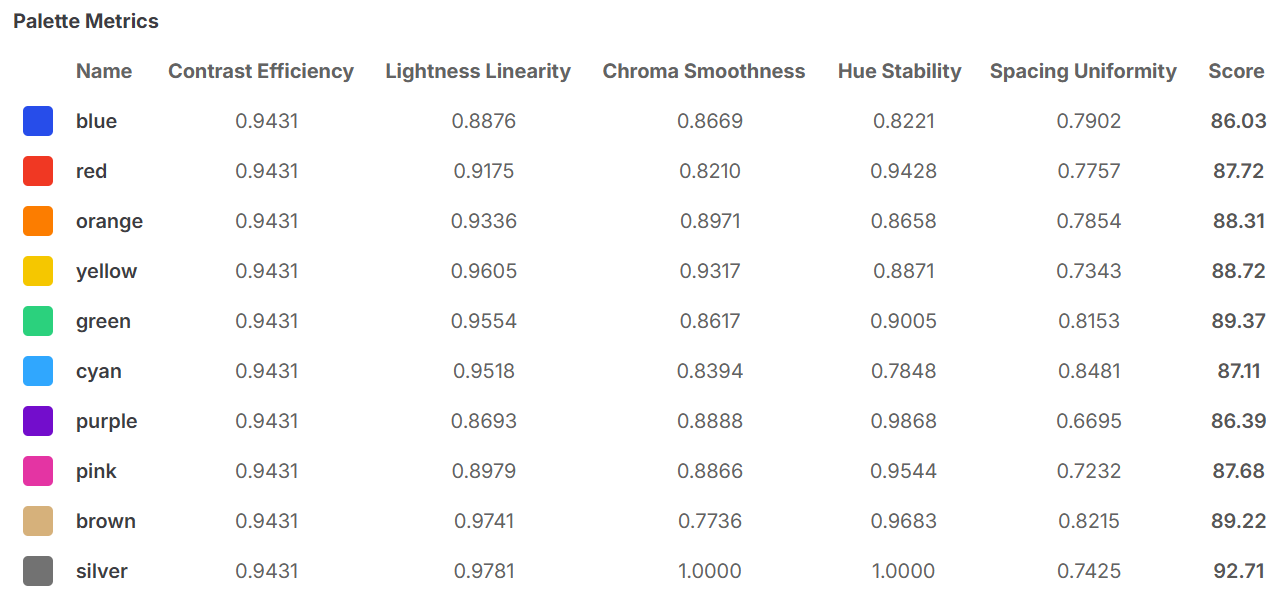
Most designers evaluate a palette by eye: does it look harmonious? Are the shades distinct enough? Does it feel right?
These are reasonable starting points. They're also incomplete. A palette that looks right in isolation can still fail in production — wrong shades for text, harsh transitions between steps, a dark mode that breaks entirely.
The problem is that visual judgment can't detect structural issues. You need to measure them.
Chromametry evaluates every palette across five metrics. Each one catches a different class of failure.
1. Contrast Efficiency
What it measures: How many shade pairs in the palette achieve WCAG 4.5:1 contrast, relative to the theoretical maximum.
A palette with 12 shades has 66 possible pairs. Contrast efficiency tells you what fraction of those pairs are actually usable as text/background combinations.
A high score means the palette gives you flexibility — many valid combinations to choose from. A low score means most pairs fail, and you'll constantly be working around accessibility limits.
What goes wrong: Palettes with too many midtones and not enough light or dark extremes tend to cluster contrast pairs at the edges. Most of the palette is "unusable" for text. You end up with a 12-shade palette where only 3 shades can serve as text on white, and 2 on black.
What the data shows: In the 11-system benchmark, contrast efficiency separates the top tier from the bottom sharply. IBM Carbon (η=0.911) and Adobe Spectrum (η=0.943) both have K ≈ N/2 — the density ratio that maximizes accessible pairs. Shopify Polaris (η=0.282) has K=15 in a 17-step palette: 93% of the range is consumed by a single contrast requirement, leaving almost nothing for secondary roles.
2. Lightness Linearity
What it measures: How evenly lightness is distributed across the steps.
A perfectly linear palette would move from dark to light in equal perceptual steps — each shade is the same "distance" from its neighbors in perceived brightness.
What goes wrong: Many palette generators produce shades that cluster in the middle. Steps 4 through 9 look nearly identical, while the jump from step 1 to step 2 is dramatic. Components built on this palette inherit the problem: hover states are invisible where steps are close, and active states look harsh where steps are far.
Why this matters for designers: Lightness linearity is what makes a palette predictable. When steps are evenly spaced, you can reason about "one step up" or "two steps down" and get consistent results across the entire scale. When they're uneven, every component requires individual tuning.
What the data shows: Measured using EAL (Equivalent Achromatic Lightness, High et al. 2023) — a perceptually corrected lightness that accounts for the Helmholtz–Kohlrausch effect on chromatic colors. L* in CIELAB is insufficient because it is only perceptually uniform for achromatic colors. In the benchmark, Adobe Spectrum (L=0.933) and IBM Carbon (L=0.930) score highest; Shopify Polaris (L=0.728) and Material UI (L=0.797) score lowest — both built using HSL-derived generation methods that do not correct for perceptual non-uniformity.
3. Chroma Smoothness
What it measures: How consistently saturation changes across the steps.
Saturation shouldn't jump randomly from step to step. A smooth palette increases or decreases saturation gradually — the arc is intentional and consistent.
What goes wrong: Many palette tools adjust hue and lightness carefully but leave chroma to drift. The result is a palette that looks fine as a strip but produces visible "dull patches" or "oversaturated blobs" when used in components. A button at shade 6 might look vivid while a badge at shade 5 looks washed out — even though they're neighbors.
Why this matters for designers: Chroma smoothness is what makes a palette feel coherent. When saturation is erratic, the palette reads as a collection of individual colors rather than a unified system.
What the data shows: Atlassian (Sc=0.909) and Adobe Spectrum (Sc=0.879) score highest — both use perceptual color spaces for generation. Material UI (Sc=0.786) and Shopify Polaris (Sc=0.689) show the most erratic chroma curves, consistent with palettes built by adjusting individual shades manually rather than through a smooth interpolation arc. Chroma smoothness is the metric most directly correlated with generation method.
4. Hue Stability
What it measures: How much the hue shifts across the steps.
Some hue rotation is expected — a blue palette naturally drifts slightly warm in the light shades and cool in the dark ones. But large or irregular hue shifts break the palette's identity.
What goes wrong: Palettes built in RGB or HSL tend to shift hue dramatically toward the extremes. A "brand blue" at the midtone becomes greenish at the light end and purplish at the dark end. In a dark mode component, the brand color no longer reads as blue. In a light mode badge, it reads as teal.
Why this matters for designers: Hue stability is what makes a palette feel like one color across all its shades. When hue is stable, "primary blue" stays blue whether it appears as a light background, a dark text shade, or a vivid button fill. When hue drifts, the palette fractures into multiple perceived colors.
What the data shows: Hue stability (H) is the most consistent metric across all 11 systems — ranging from 0.914 to 0.947. This narrow band suggests modern design systems converge on hue consistency regardless of other structural choices. It is the easiest dimension to get right, and the least differentiating. The real divergence is in contrast efficiency and spacing uniformity.
5. Spacing Uniformity
What it measures: How evenly the steps are spaced in perceptual color space — combining lightness, chroma, and hue into a single distance measure.
This is the most holistic metric. Even if lightness is linear and chroma is smooth individually, the overall perceptual distance between adjacent steps can still be uneven.
What goes wrong: Two shades that are "one step apart" can feel very different depending on where they sit on the scale. A hover state at the light end of the palette is barely visible, while the same one-step hover at the midtone is dramatic. Designers who expect consistent behavior across the palette get inconsistent results.
Why this matters for designers: Spacing uniformity is the final test of whether the palette works as a system. If steps are evenly spaced perceptually, every interaction state behaves consistently at every shade. If they're not, each zone of the palette requires separate treatment.
What the data shows: Spacing uniformity (U) is the most differentiating metric in the benchmark — it ranges from 0.467 (Shopify Polaris) to 0.800 (USWDS), a 70% spread. It also has the strongest correlation with overall score: the three lowest-scoring systems (Material UI 69.43, Radix UI 67.80, Shopify Polaris 57.16) all score below 0.55 on spacing uniformity. When this metric fails, all others degrade too — it is the composite indicator of ramp structure quality.
Why Five Metrics, Not One
Each metric is necessary because each one catches failures the others miss.
A palette can have excellent contrast efficiency but terrible hue stability — it's accessible but incoherent. It can have perfect lightness linearity but uneven chroma — it's predictable in brightness but erratic in saturation. It can pass all four individual metrics but still have poor spacing uniformity because the interactions between dimensions aren't accounted for.
The composite score combines all five. A palette that scores 90+ has been verified across all structural dimensions: it's accessible, coherent, predictable, and systematic. A palette that scores 60 has at least one structural flaw that will surface in production.
Visual judgment finds the wrong things. It catches obvious color mistakes and bad vibes. It misses the structural issues that show up six months later when a designer asks why the hover state is invisible on mobile and nobody can explain it.
Measure the palette. Know what you're working with.